Smart Remote - Easy TV Control
Figuredin
4.3
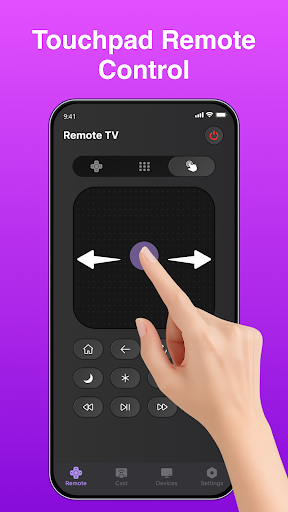
Smart Remote - Easy TV Control combines an Android home screen launcher with convenient TV remote features. Connect to a compatible smart TV over Wi-Fi and access supported controls directly from your phone.
📺 CONTROL YOUR TV
• Connect to compatible smart TVs over Wi-Fi
• Adjust volume and use power controls when supported by your TV
• Navigate menus and control playback from your phone
• Launch supported TV apps and navigate available channels
• Use a clear remote interface designed for everyday control
Available controls may vary depending on your TV brand, model, network connection, and supported features.
🏠 YOUR HOME SCREEN
Smart Remote - Easy TV Control also includes an Android launcher that can be set as your default Home app.
• Quick access to installed apps
• Built-in web search from your Home screen
• Access available news and content
• View weather information when enabled
• Open TV remote controls from your Home screen
• Simple navigation with a clean interface
Using Smart Remote - Easy TV Control as your default Home app is optional.
⚡ SIMPLE SETUP
If you want to use the launcher experience, you can choose to set Smart Remote - Easy TV Control as your default Home app during setup.
You can change your default Home app at any time through Android settings.
TV remote features are designed to work with compatible smart TVs connected to the same supported network.
🔐 PERMISSIONS
Smart Remote - Easy TV Control may request permissions needed for features you choose to use.
• Local network access helps discover and connect to compatible TVs
• If you enable local weather, location may be used to provide weather information for your area
• If you allow notifications, the app can display optional weather information, search shortcuts, and app-related notifications
Permissions can be reviewed and managed through Android settings.
🔎 WEB SEARCH
The Home screen includes an optional web search feature powered by Google.
You can use the search bar to search the web directly from your Home screen.
Download Smart Remote - Easy TV Control for convenient access to TV controls, apps, web search, weather, and news from your phone.
평균 평가
101.33K+
평가 내역
추천 리뷰
Khalen McCoy 작성
2026-09-15
버전
advertisementsperformance_and_bugsinstallation_and_setupsecurityI downloaded this remote and my entire phone layout was different. I had no home screen and I couldn't properly toggle between apps. On top of that, it had nonstop ads when I would try to use the app and the remote itself didn't even work. I had to go all through a bunch of different settings on my phone to even get the app gone off my phone. When I didn't everything went back to normal. Do not get this app
Marisa McCain 작성
2026-07-10
버전
performance_and_bugsinstallation_and_setupdesignadvertisementsIf I could leave 0 stars, I would. I downloaded this app to use for my Roku TV, and it completely took over my phone and changed EVERYTHING. It wouldn't even let me toggle over the widget to uninstall the app. I had to *jump through hoops* in order to figure out how to get my phone back to to the way it was. Once I was able to uninstall it, everything went back to normal... That was absolutely NOT okay. The remote didnt even work!!!
Danika 작성
2026-09-11
버전
installation_and_setupsecurityDo not install this app. It is not safe. It completely changes your home screen upon installing. I don't know what else it tries to access but I didn't want to find out. It will not uninstall like a normal app either. Once uninstalled, home screen returns to normal. The remote did not work either. It did find devices in my home, but who knows what it was trying to actually access. To uninstall it: - Settings > Apps > Find the app
스크린샷